
Arch vs NixOS —
Six Months Distro Hopping.
A comparison write-up from a complete Linux distro-hopping speed run — January through July 2026. What these two actually do differently, in plain language, and why either one might suit you.
From Windows to looking elsewhere.
My first taste of Linux was Ubuntu — briefly, never went back — and then Linux Mint, coming off Windows 10/11 after many years as a fairly "normie" computer user who mostly played games or watched YouTube all day.
The turning point was Windows 11 genuinely hogging too many resources — RAM, CPU, spinning my GPU fans up even while idle. Linux Mint was a big improvement on that front, but the way you find and install programs (packages, in Linux terms) wasn't as smooth as I wanted. A lot of Mint's software arrives as Flatpaks, and I found myself wanting to get closer to the actual system than that format allows.
Think of it as a package that carries its own mini-environment inside it — all the pieces it needs to run, bundled together and kept separate from the rest of your system. Similar in spirit to how a phone app ships with everything it needs rather than leaning on the system around it. This makes Flatpaks very safe and consistent across different Linux distributions — but it can feel slightly removed from how the rest of your system works, which is part of why I went looking further.
Fast forward to Arch and NixOS — distributions that let you get much closer to the actual system, without a sandboxing layer sitting between you and the software.
A myth worth correcting first.
Before comparing the two, one thing needs clearing up — because I had it wrong myself, and it's the kind of misunderstanding that quietly shapes how you think about both distros.
I used to think Arch and NixOS packages were "compiled directly from source" to make them run as their own true entity. That's not quite right for the everyday case:
- Arch's official repositories (
core,extra,multilib) hand you pre-built binary packages — same idea as a Windows.exein spirit, just properly managed. A standardpacmaninstall compiles nothing. - Source compilation on Arch happens through the AUR (Arch User Repository) — community build recipes called PKGBUILDs. Your machine downloads the source and builds it locally with
makepkg. That's the "compile it yourself" experience — but it's the exception, not the rule. - NixOS works the same way. It pulls pre-built binaries from a cache (
cache.nixos.org) by default, and only compiles from source locally when a binary isn't in that cache — relatively rare for popular packages.
So both are mostly binary-first, with source compilation as a fallback or a deliberate choice — not the standard path.
Two tools, two disciplines.
Both reward the person willing to go deep, but they get there in genuinely different ways. Here's the short version, side by side.
Arch hands you the tools to start barebones and grow into a deep, tinkered system through the terminal. It runs on a rolling release — you're always on the latest version of everything, and frequent updates become a normal part of daily life.
You add capabilities one command at a time. The discipline of maintaining it is the point.
NixOS puts you in a configuration file, written in the Nix language, applied with one command: nixos-rebuild switch. You become directly aware of exactly what gets installed, because you write it explicitly.
Need printing? Bluetooth? Firewall rules? You declare them the same way — often without installing a separate program, because the capability was likely already built into NixOS if you look deep enough into the config.
This entry stays deliberately hands-on. For the deeper dive — how Linux RAM works completely differently to Windows, NixOS "generations" and instant rollbacks, and my full five-tool minimalist stack — see SQ07 — Linux Distros & Full Stack Currents. The two posts are meant to be read together.
We all have preferences, and how long you spend at a computer shapes your workflow. Do you want to click your way to where you're going, or move fast with the keyboard without thinking too hard about what should open or close? It's a genuinely deep rabbit hole — because a lot of the clunky limitations we got used to on Windows (things not opening properly, ad pop-ups, a program refusing to run because it's "outdated") tend to disappear once you're properly set up on Linux.
Same job, side by side.
Arch Linux
On Arch you install straight from the terminal:
-Sy trap
My original note here said sudo pacman -Sy, with "-y for the latest version." That needed correcting, because it's actually flagged as risky practice:
-ymeans sync/refresh the package database — it does not mean "get the latest version" as a general idea.- Running
pacman -Sy packagenameon its own — refreshing the database without also upgrading the whole system — is specifically called out by the official Arch documentation as something to avoid. It can leave you with mismatched dependencies, sometimes called a "partial upgrade." - The safer pattern: just run
sudo pacman -S packagenamefor a normal install, or run a fullsudo pacman -Syufirst if you want to update everything before installing something new.
NixOS
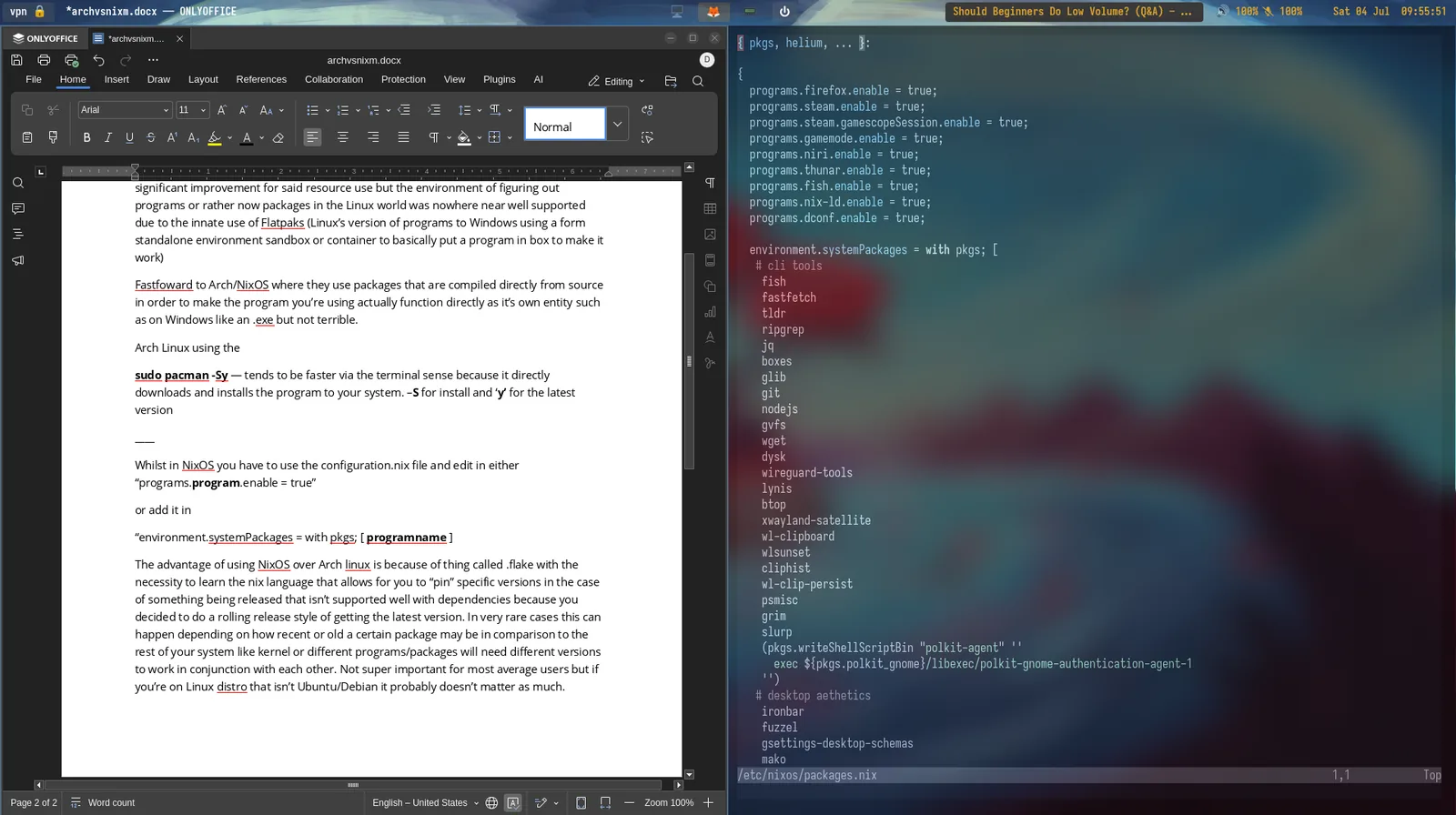
On NixOS you don't run an install command — you describe what you want. Edit /etc/nixos/configuration.nix and either enable a program:
…or add it directly to your system packages list:
Then apply the change and NixOS builds exactly what you wrote — nothing more:
Pinning what actually matters.
One of the real advantages of NixOS over Arch is something called a flake. It asks you to learn a little of the Nix language, but in return it lets you "pin" specific versions of packages.
On a rolling-release setup you're always grabbing the newest version of everything. Occasionally a fresh release doesn't play nicely with your other software, because packages sometimes need very specific versions of each other to work — your kernel, your libraries, your applications all have to agree. Pinning locks a package to a known-good version so an update elsewhere can't quietly break it. This matters most for developers working on remote systems limited to a terminal, where a broken dependency chain isn't just annoying — it can stop you working entirely.
Meanwhile, on Arch, running:
…forces your whole system to the most recent version of everything installed. Great if you want to always be current and don't mind the small chance an update breaks something elsewhere — which, realistically, depends heavily on what you actually use the machine for.
The power-user lean.
I fall into the "power user" category, but I'm not in a rush to have the absolute latest of everything. What I love is the depth of customisation that comes from tinkering with configuration files — making the most of my desktop space. My inspiration has been a desktop that uses zero gaps and borders, because I treat visual padding as a kind of bloat — I don't need empty space to tell me where one window ends and another begins. Instead I use a focus ring: an ultra-minimal 1-pixel outline around whichever window is active. Paired with Niri, I can bind keys to move around my whole desktop without leaning on the mouse — a habit from years past I'm actively unlearning.
Going down this path led me into different configuration formats — .jsonc, .toml, .lua — the small, purpose-built languages that power how individual tools behave. There's a genuinely large community behind whichever distribution you land on, because people love building things that work well or improve daily computing. A completely different feeling from hoping a downloaded .exe on Windows just works.
Moving without the mouse.
These are the bindings I actually use every day. Super is the Windows key. Nothing exotic — just enough to run the whole desktop from the keyboard.
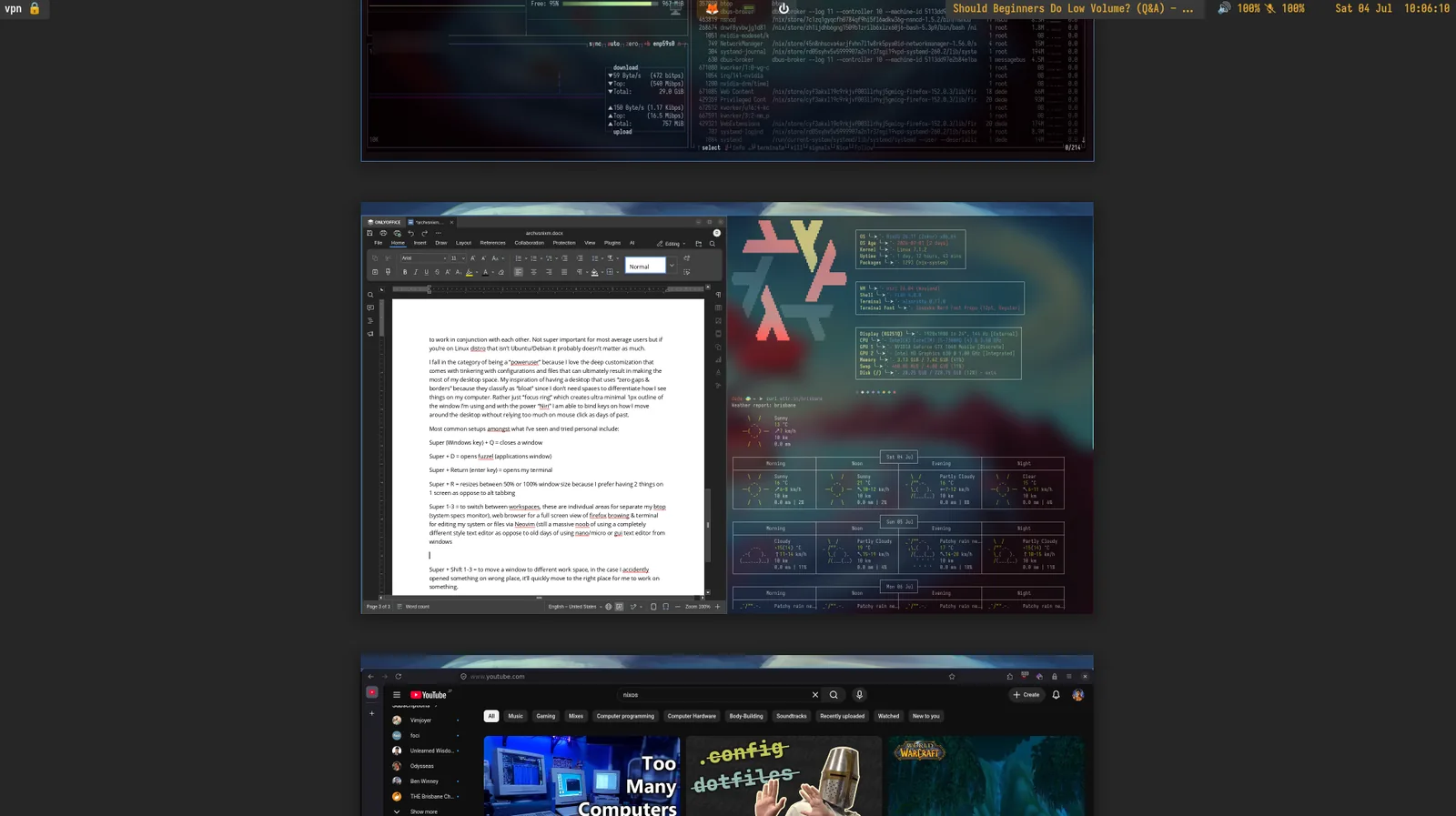
My three workspaces split cleanly: btop for system monitoring, a full-screen browser, and a terminal running Neovim for editing files and configs — still very much a beginner with Neovim's editing style after years of nano, micro, or GUI editors on Windows.
The Super + Shift + 1–3 combo is the quiet hero of the setup — if something opens in the wrong workspace by accident, one keystroke sends it exactly where it should be.
The actual point.
This whole transition — away from Windows, and honestly away from ever seriously considering macOS (the "designer" markup on a nicer chassis plus more subscriptions was never for me) — taught me to make the most of the hardware I already own. Deep-diving into wikis, forums, and using Claude to troubleshoot let me build a system that is actually mine.
Not a pre-built GUI where the only real customisation is a wallpaper or an accent colour — real control over how the system opens programs, what I use the computer for, and, maybe most importantly, freedom from being bombarded by ads or asked for a subscription just to complete basic tasks.
I don't want to be stuck with a machine that breaks because it's "getting old," or gated behind a paywall to do something I should already be able to do. It's genuinely worth diving into this rabbit hole — even starting with the most beginner-friendly distributions like Linux Mint, Fedora KDE, or CachyOS if you're a gamer who wants a faster system, no ads, and solid native Steam support.